In the world of preservation, whether it’s for museums, government archives, or educational institutions, the right equipment is crucial for digitizing delicate items without causing damage. Unlike standard scanners or basic apps, specialized scanners for fragile documents are designed to handle fragile documents and art with the utmost care, ensuring their longevity and accessibility.
Why Specialized Scanners are Necessary for Fragile Items
Common scanners often used in offices are not suitable for fragile documents and artworks. Roll scanners and sheet feeders, for example, can damage originals by pinching or tearing them if they catch an edge. Furthermore, removing items from their frames for scanning can also pose a risk of damage.
The Advantages of Digitizing Fragile Art and Documents
Digitizing artworks and fragile documents not only helps in reducing physical storage needs but also safeguards the items against potential disasters, such as fires. Moreover, digital reproductions allow for the creation and sale of high-quality copies, making art more accessible and generating additional revenue streams for artists and institutions.
Top Recommended Scanners for Fragile Artwork by Steven Enterprises
Features: This scanner can handle media up to 8 inches thick and includes internal lighting that creates a 3D effect to enhance the details in artworks. It scans items by sliding them across a flat table, minimizing contact and potential damage.
Price: Approximately $40,000 to $50,000.
General Benefit: Operates as a standalone scan station with a touchscreen interface, requiring no dedicated computer or network connection.
Features: Offers a more affordable solution with the same 3D lighting feature as the WideTEK 36 but with a smaller scan bed. Ideal for projects with smaller dimensions.
Price: Significantly less than the WideTEK 36, with prices varying depending on the bundle chosen.
Features: Best for super fragile documents due to its flat glass feature that ensures the scanner lid does not touch the artwork. Although it does not offer 3D scanning, its gentle handling is unparalleled.
Features: Designed for extremely large documents, this scanner can handle sizes up to 42×60 inches and is contact-free, perfect for large format art or thick, framed items.
Price: Over $50,000.
Suitability: Ideal for entities needing to scan very large artworks or documents with a need for extra care.
Safeguarding Your Valuables with the Right Scanners for Fragile Documents
Selecting the right scanner for fragile documents and artwork is crucial for ensuring their preservation while making them accessible for future generations. Steven Enterprises offers a range of scanners that are specifically designed to meet the needs of various professional environments, from small art studios to large museums.
Need expert guidance on selecting the right scanner?
Contact Steven Enterprises today at (800) 491-8785 for a personalized consultation. Let us assist you in choosing the perfect scanner to support your artwork digitization and document preservation projects.
If you’d prefer to have our team reach out to you, you can also fill out the contact form below.
Libraries are increasingly turning to technology to preserve and enhance the accessibility of their collections. Large format book scanners are pivotal in this effort, enabling libraries to digitize books and fragile documents effectively.
Whether it’s for archiving rare manuscripts or providing digital copies to students, the right scanner can make a significant difference.
In this article, Steven Enterprises printing experts will explain the basic information you need to know to understand the different types of book scanners on the market and which ones we recommend to city libraries and educational institutions.
Why Libraries Need Large Format Book Scanners
After helping many libraries find the best large format scanners for their operations, we’ve found there are 3 common applications:
Digitization: The task of transforming physical books into digital formats for easy access on library websites, enhancing their member’s engagement and accessibility to renting books.
Education Support: Typically school libraries also will need scanners to allow students to take digital snippets of texts, supporting their academic work without needing to check out entire volumes (which in turn would require more copies than needed).
Preservation: More common in city libraries, the last application is to safely scan and archive fragile books and documents that are susceptible to damage. For example, old manuscripts written in pencil or city planning documents. By scanning these, libraries ensure the longevity and continued availability of these books for research and exploration.
Core Features of Bookeye Scanners by WideTEK
Steven Enterprises has partnered with WideTEK, since we believe they have the best scanners on the market today. We typically recommend that libraries invest in the Bookeye scanner series since it has the most robust features tailored for their use.
Here are some features libraries value most when using their bookeye scanners:
Top-Mounted Camera: Unlike other scanners that have the documents roll through the machine, this camera ensures minimal contact with documents, preserving the integrity of fragile pages and avoiding rips and breakage to the actual books.
Stand-alone software: The scanner has the software installed natively and operates with just a touchscreen monitor. No external computer is needed to manage it, but you can easily access it using the IP address, making it compatible with all types of computers (including MACs!)
Versatile Scanning Options: The flexibility to scan directly to USB, email, or save to the scanner’s built-in Linux-based controller.
Book Mode Scanning: You can choose between scanning pages together or individually, adapting to the specific needs of the material and reducing file sizes when needed.
Top Large Format Book Scanners for Libraries in 2025
In the Bookeye series, the versions of the scanner differ by the size of the book they can scan:
Bookeye V3: This compact model handles standard book sizes up to 15×19 inches, perfect for school and university libraries.
Bookeye Archive V2: Accommodates larger “grand format” books up to 18×24 inches, ideal for city libraries housing historical and larger volumes.
Bookeye V1: The largest model available, suitable for very large and fragile books up to 24×36 inches. This series is more commonly bought by businesses with one-of-a-kind books, rather than a library. If you believe you might need this model, consulting with our printing experts is advised since there might be more specialized scanners like the MicroTEK series for you to consider.
Selecting the Right Bookeye Model for Your Library
Once you know which version is right for you, the next step for you to determine is which model you’re going to need. The difference here is going to the resolutions of the scan:
Bookeye Kiosk: Offers 400 DPI scanning with a WiFi option, suitable for standard library needs.
Bookeye Pro: Steps up to 600 DPI for higher quality scans and includes a batch scan wizard for more efficient processing.
Selecting the Right Scanning Mode
Finally, you’ll need to decide if you need to upgrade to a flat glass or if the standard V-shaped mode is fine for your scanning project:
V-shaped Glass: Ideal for extremely delicate books, this scanner gently flattens pages without damaging the spine.
Flat Glass Mode: Suitable for less fragile items, providing the option to compress pages for a clearer scan. An add-on feature for the Archive model also allows scanning of occasional photos, enhancing versatility.
Empower Your Library with the Right Scanning Technology
Choosing the right large format book scanner is more than just purchasing new equipment. It’s about investing in the preservation and accessibility of knowledge.
With the Bookeye scanners, libraries can safeguard their collections. Moreover, they can make them more accessible to the public and researchers worldwide.
Need expert advice on the best large format book scanner for your library?
Contact Steven Enterprises today at (800) 491-8785 for a personalized consultation or submit a contact form here. We’ll help you find the right scanner that can help your library effectively run your digitization and document preservation projects.
With book digitization projects becoming increasingly more popular, there is an influx of book scanners available online for a wide range of prices.
Buying the right book scanner for your project is therefore becoming increasingly more complicated. You cannot rely on online reviews to tell you which book scanner is right for your business, because it all depends on the purpose of your digitization project.
Scanner apps and smartphone software promise high-quality outputs for a low price. But for businesses, these cheap solutions often have many hidden costs that can be detrimental for the digitization project.
In this blog, we’ll review the top 5 mistakes we see our customers make when buying a book scanner without our expertise input. We hope that this makes it possible for you to avoid these costly mistakes yourself and get it right the first time.
Digitization Projects That Require a Professional Book Scanner
As people are getting increasingly more used to reading documents on their smartphones, tablets, and computers, there has been a rise in digitization of printed materials. Both in the professional workplace and in the archiving of personal documents.
Our industry-leading team at Steven Enterprises has helped over 30,000+ satisfied customers. In all those 30+ years, we’ve noted the following most common digitization projects that were better off with a professional book scanner solution:
Scanning newspapers, periodicals, catalogs and magazines. Even though physical books still retain their charm, businesses are able to generate more revenue by also making these commercial products available for reading on our devices.
Preserving books and sensitive historical documents. Government programs are continuing to digitize our most important printed materials to future-proof them from possible damage, while saving big on on-going expensive preservation techniques.
Digitizing bound and stapled documents. More common in professional service businesses, digitizing things like contracts, accounts and documentation has become critical for making online accounting and book-keeping possible.
Digitizing files from file folders. With a remote workforce becoming increasingly more common, important files are often immediately scanned into the cloud (or other online platforms) so that they can be easily shared across organizations and accessed anywhere, anytime.
Archiving documents digitally. Real-estate is getting more expensive every year, so many national and local government agencies, registries and nonprofit organizations are digitizing their file rooms to free up space or cut fees for offsite storage.
Costs From Buying the Wrong Book Scanner
At first, it’s not always obvious how choosing the wrong book scanner can affect future costs. So what if the images are a little distorted or low-quality?
Our customers who chose the wrong book scanner before talking to one of our experts, tell us that the hidden costs were detrimental for their staff and set them back significantly in their digitization project timelines.
Low-quality book scanners are not built for digitizing at scale. Which means your staff will be far less productive when completing their scans. Hours lost to malfunctioning scanners, post-scan quality control, and troubleshooting are hard to quantify.
To avoid this, it’s crucial to be educated on these common mistakes. Just by having the awareness will already set you miles ahead of others.
Mistake #1 – Choosing Low Resolution Cameras
The first mistake we commonly see is looking at the book scanner at face-value.
Having your team use a free app on their phone seems like a good idea at first; but nothing is really free.
It can be easy to choose what look like cost-effective alternatives available on Amazon. But don’t make the mistake of just buying a digicam mounted on an expensive frame.
If your digitization project is for anything more advanced than just scanning a few personal documents, you need a true scanner solution. Look for a high-quality digital camera with light sources on both sides.
Another signal of quality is if there is any mention about dark mode operation. These types of features will enhance the scan quality through less light reflection, saving you hours in re-scans and edits afterward.
Mistake #2 – Buying the Wrong Book Cradle
With so many models available, it can be challenging to know what the right cradle is for your project. But having the wrong cradle can leave you with low resolution scans that are not usable later on.
To know what you need, take inventory of the maximum diameter and height of your books that will need to be scanned. This will help you identify the minimum size machine you will need and if the cradle should be flat or V-shaped.
V-shaped cradles are also a better solution for documents that need to be handled with care. The reason is that the pages will not need to open 180 degrees to be scanned, making it less likely to cause damage to the books.
Should you have thicker books, having the wrong cradle may also result in visible book fold lines. This can distort the reading experience and make your project much harder to digitize. Certain book cradles have book fold correction, with height adjustments built in for this exact project.
Mistake #3 – Forgetting About the Book Scanner Operator
When buying a professional book scanner, it’s also important to keep the staff in mind that will be operating the device daily.
Live Preview: A wide screen, on eye-level that will show the operator the preview of the scan so that they are straight and have the proper lighting.
Automation: Saving the person using it from doing many strenuous, repetitive tasks required to get the job done.
Dark mode: An adjustable light fixture that reduces eye strain when using it for long periods of time.
If your digitization project is going to be done at scale, these are critical features that will help you maximize productivity and also help you hit your timeline goals.
Mistake #4 – Not Considering the Book Digitization Software
It is not uncommon for buyers to focus too much on the manual process of getting the scans, that they overlook the software capabilities that they require.
When working with an expert from Steven Enterprises, we always begin with understanding the end goal of your digitization project. Once we understand what the scans will be ultimately used for, we can recommend a book scanner software that meets the taxonomy and indexing goals you have.
For example, did you know some book scanners are capable of scanning braille and 3D items? This advanced feature is not commonly needed, but can make a big difference for the right project.
Another important consideration is the ability to “scan to” some other digital format. Our wide-range of book scanners have tons of ways to share your scans:
Scan2USB: Walk up scanning to any USB device
Scan2Print: Output to any connected printer or hot folder
Scan2Network: Output to any network drive
Scan2Pad: Scan and store images to mobile devices
Not fully understanding the software your book scanner has and the potential additional hardware your book scanner will require to get the job done can be a costly mistake.
Mistake #5 – Not Considering the Maintenance Costs
The last mistake, and probably the most costly of all, is the maintenance costs.
When you buy lower-quality book scanners, you often pay for it in the long-run. Sometimes it comes in the form of labor hours by your staff troubleshooting the scanner. Other times its actual expenses to have a technician come on-site and install new firmware or perform maintenance.
Our customers rarely face this issue since we partnered up with WideTek Book Scanners, made in Germany. These scanners are known for their remote maintenance, troubleshooting and firmware updates. Just this feature alone has saved our customers significantly in their digitization project costs.
Another mistake people make is that they buy a scanner that only works when it’s connected to a network. This outdated technology makes their books scanning software vulnerable to viruses and crashing when the network is unstable.
All the book scanners we recommend don’t have this from this outdated technology. Our scanners have less downtime making it faster to get your documents scanned.
How to Ensure a Painless Book Scanner Purchase
As you can tell, there’s lots to keep in mind when buying your book scanner for your digitization project. To avoid making these mistakes, it is always best to consult a professional.
Our Equipment and Account Specialists have years of in-depth industry experience. Let us help you sell, lease, rent, and furnish supplies for all models of printing, copying and scanning equipment.
Let us help you find the ideal book scanner for your digitization project. Contact us today by filling out this form, to have your scanner up and running in a matter of days.
Get a Free Consult with a Printing Expert
Book a consultation with a certified printing expert to discuss your large format printing needs.


 As people are getting increasingly more used to reading documents on their smartphones, tablets, and computers, there has been a rise in digitization of printed materials. Both in the professional workplace and in the archiving of personal documents.
 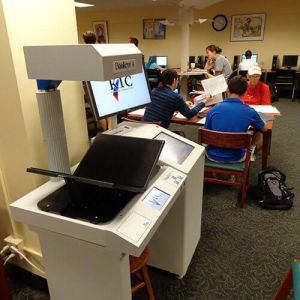 With so many models available, it can be challenging to know what the right cradle is for your project. But having the wrong cradle can leave you with low resolution scans that are not usable later on.
  When buying a professional book scanner, it’s also important to keep the staff in mind that will be operating the device daily.
  It is not uncommon for buyers to focus too much on the manual process of getting the scans, that they overlook the software capabilities that they require.
  The last mistake, and probably the most costly of all, is the maintenance costs.