
Are the KIP Digital Displays Worth Buying for Architects?
KIP Digital Displays offer a purpose-built solution for AEC professionals who want to move beyond paper plans.
At Steven Enterprises, we have seen that this is what professionals are after without sacrificing the collaborative benefits of reviewing designs together.
But are they worth the investment?
Let’s explore what these displays offer and whether they make sense for your practice.
The Digital Shift in AEC: Why KIP Full Display Matter
In 2026, the era of “dog-eared” paper plans pinned to trailer walls is ending.
While many firms have tried to bridge the gap using standard smart TVs, they quickly hit a wall.
TVs aren’t interactive, they aren’t rugged enough for job sites, and they can’t handle high-resolution CAD markups.
KIP Digital Displays are the professional alternative. These 4K touch-enabled systems are built specifically for the AEC industry to facilitate real-time “redlines,” project estimating, and coordination meetings.
The KIP Full Display Lineup
Here’s a breakdown of the three main product categories and their price ranges: 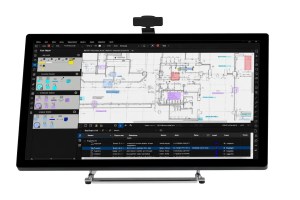
Tabletop Displays: $6,000 – $10,000
The KIP Tabletop is the perfect entry point for firms that already have existing furniture but need to digitize their review process.
Key Features:
- Space-efficient design ideal for offices with limited room
- Touch-enabled interface for intuitive plan navigation
- Perfect for individual designers reviewing plans at their desks
- Suitable for job site trailers where space is at a premium
Best For: Quick “plug-and-play” review sessions and smaller coordination meetings.
Plan Desks: $13,000 – $16,000
The KIP Plan Desk is a dedicated workstation designed for the individual project manager or estimator. 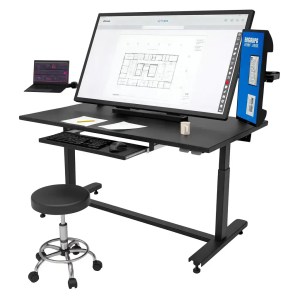
It combines a large 4K touchscreen with a secondary 22″ side monitor for multitasking.
Key Features:
- Integrated workstation design for dedicated review stations
- Ergonomic construction for comfortable extended use
- Larger screen sizes for detailed plan review
- Professional appearance suitable for client-facing areas
Best For: Detailed plan markups, estimating, and maintaining a digital trail for change orders.
Plan Tables: $16,000 – $19,000
The KIP Plan Table is the flagship for team collaboration. 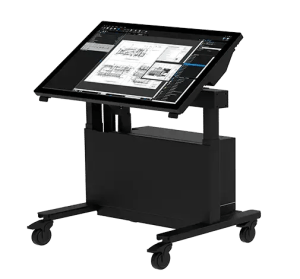
This mobile, motorized system is designed to be the centerpiece of a job site trailer or a design-build “war room.”.
Key Features:
- Large screen sizes for team collaboration and presentations
- Multi-user interaction capability for collaborative design reviews
- Optional mobility with wheeled bases for flexible positioning
- Conference table form factor familiar to traditional plan review workflows
- Professional presentation quality for client meetings
Best For: Contractor coordination meetings, progress reviews, and large-scale infrastructure projects.
The Honest Alternative: Smart TVs
Let’s address the elephant in the room: couldn’t you just buy a large smart TV instead?
The honest answer is yes, you could. A 55-inch or larger smart TV can display plans when you cast your phone, tablet, or computer to the screen.
For basic plan viewing, a smart TV will cost significantly less; often just a few hundred dollars compared to several thousand for a KIP Digital Display.
However, that comparison only tells part of the story. KIP Digital Displays offer substantial advantages beyond simple plan viewing:
Purpose-Built Software Integration
KIP displays are designed to work seamlessly with AEC software platforms. They support native integration with common plan viewing and collaboration tools, eliminating the need for workarounds or complex screen sharing setups.
Multi-Touch Collaboration
While smart TVs may offer basic touch capabilities, KIP displays support sophisticated multi-touch interaction that allows multiple team members to annotate, mark up, and navigate plans simultaneously.
Precision and Accuracy
KIP displays are calibrated for the precise rendering of technical drawings with accurate scaling, dimensions, and line weights. Consumer TVs prioritize video entertainment, not technical accuracy.
Workflow Optimization
From specialized annotation tools to document management features, KIP displays are optimized for AEC workflows in ways that generic displays simply aren’t.
Professional Appearance
In client-facing environments, the professional appearance and purpose-built design of KIP displays convey competence and technological sophistication that consumer electronics don’t match.
Who Should Invest in KIP Digital Displays?
KIP Digital Displays make the most sense for organizations that:
- Prioritize Collaborative Design Review: If your workflow depends on teams gathering around plans for detailed review and coordination, the interactive capabilities of KIP displays significantly enhance that process.
- Have Already Embraced Digital Workflows: Firms that have moved to cloud-based collaboration, digital plan management, and tablet-based fieldwork will find that KIP displays integrate naturally into their existing workflows.
- Value Professional Client Presentation: If you regularly present designs to clients and want to create impressive, interactive presentations, KIP displays deliver a professional experience that sets you apart.
- Work on Complex Projects: Large, complex projects benefit from the ability to zoom, annotate, and navigate digital plans collaboratively during coordination meetings.
- Have Budget for Technology Investment: Most large AEC firms have substantial budgets built into projects for technology and equipment. For these organizations, the investment in KIP displays is easily justified by improved efficiency and reduced printing costs.
Real-World Applications
KIP Digital Displays excel in specific scenarios:
Job Site Trailers
Construction trailers are ideal locations for KIP displays. Superintendents, project managers, and subcontractors can gather around the display to review plans, coordinate work, and discuss field conditions without printing multiple plan sets or struggling to read plans on small tablet screens.
Design Office Collaboration
Design teams can use Plan Tables for regular design reviews, allowing architects, engineers, and consultants to collaborate on plan refinements interactively rather than marking up printed sheets.
Client Presentations
When presenting design concepts to clients, the ability to walk through plans interactively, zoom into details, and make real-time annotations creates a more engaging and productive client experience than static printed plans.
Explore KIP Digital Displays for Your Practice
Interested in learning more about how KIP Digital Displays could enhance your workflow?
We’re here to help you make an informed decision.
Contact us today or call us at 800-491-8785 to:
- Discuss your specific collaboration and presentation needs
- Learn more about the different display configurations
- Get detailed pricing and specifications
- Explore integration with your existing software
Our team can help you evaluate whether KIP Digital Displays are the right investment for your practice and what best meets your needs.